Compaq C++ User Documentation — C++ 6.2
| United States |
 |

|
|


Compaq C++
Using Compaq C++ for Tru64 UNIX
Systems
| Previous | Contents | Index |
2.3.17.2 Nonconstant Reference Initialization with a Temporary Object
If your program tries to initialize a nonconstant reference with a temporary object, the compiler generates a warning. For example:
struct A {
  A(int);
};
void f(A& ar);

void g() {
  f(5);  // warning!!
}
|
2.3.17.3 Static Member Functions Selected by Expressions Creating Temporary Objects
When a static member is accessed through a member access operator, the expression on the left side of the dot (.) or right arrow (->) is not evaluated. In such cases, the compiler creates code that calls the static member function to handle the destruction of a class type temporary; the compiler does not create temporary destructor code. For example:
struct A {
        ~A();
        static void sf();
};

struct B {
        A operator ()() const;
};

void f () {
    B bobj;
    bobj().sf();        // If 'bobj()' is evaluated, a temporary of
                        // type 'A' is created.
}
|
2.3.18 Exception Handling (§r.15)
Compaq C++ optimizes the implementation of exception handling for normal execution, as follows:
- Applications that do not have exception handlers incur no overhead.
- Applications with handlers that run without causing exceptions
incur only slight overhead:
- The size of an executable image increases slightly because of the tables that describe the handlers.
- Code optimization is less aggressive in the presence of handlers.
- As much as possible, overhead for exceptions is incurred when throwing an exception. Entering or leaving a try block incurs no overhead.
In Compaq C++, a procedure with handlers has no intrinsic overhead. For example, procedures with handlers do not have frame pointers or additional register usage.
Some procedures without explicit handlers may have implicit handlers. The compiler creates a handler for each automatic object that has a destructor. The compiler also creates handlers for constructors that initialize subobjects that have destructors. In such a constructor, the compiler creates a handler for each member with a destructor, and a handler for each base class with a destructor.
The -nocleanup option suppresses generation of such implicit handlers, which results in an executable file that is slightly smaller. You should use this option for programs that do not use exception handling or that do not require destruction of automatic objects during exception processing.
Exception specifications in function prototypes that conflict with
function definitions are illegal. Chapter 7 describes how
Compaq C++ handles such conflicts. Beware of such conflicting
exception specifications, particularly if you have exception
specifications in prototypes that are in header files accessible to
other programs.
2.3.19 File Inclusion (§r.16.4)
The #include directive inserts external text into the macro stream delivered to the Compaq C++ compiler. Programmers often use this directive to include global definitions for use with Compaq C++ functions and macros in the program stream.
The #include directive has the following search path semantics:
- Quoted path names:
- Quoted path names are first searched for in the directory that contains the file with the #include directive.
- If the file is not found, the search continues to the list of directories specified on the command line with the -i directoryname compiler option, in order.
- If the file is still not found, the compiler searches the /usr/include/cxx and /usr/include directories.
- Angle-bracketed files are searched for in the list of directories specified on the command line, then in the /usr/include/cxx directory, and finally, in the /usr/include directory.
Chapter 3
Compaq C++ Language Environment
This chapter describes the guidelines and procedures for customizing
your language environment. It includes sections on changing your C
header files to work with C++, using 32-bit pointers, organizing your
C++ files, interfacing to other programming languages, and designing
upwardly compatible C++ classes.
C header files that already conform to ANSI C standards must be
slightly modified for use by Compaq C++ programs. In particular, be
sure to address the following issues:
The following sections provide details on how to properly modify your
header files.
To modify header files, use conditional compilation and the extern specifier.
When programming header files to be used for both C and C++ programs,
use the following convention for predefined macros. The system header
files also provide an example of correct usage of the predefined macros.
3.1 Using Existing C Header Files
3.1.1 Providing C and C++ Linkage
#if defined __cplusplus
    /* If the functions in this header have C linkage, this
     * will specify linkage for all C++ language compilers.
     */
    extern "C" {
#endif

extern int func1(int);
extern int func2(int);
   .
   .
   .
#if defined __cplusplus
    }   /* matches the linkage specification at the beginning. */
#endif
|
See §r.7.4 of The C++ Programming Language, 2nd Edition for more information on linkage
specifications.
3.1.2 Resolving C++ Keyword Conflicts
If your program uses any of the following C++ language keywords as identifiers, you must replace them with nonconflicting identifiers:
| asm | friend | private | this |
| catch | inline | protected | throw |
| class | new | public | try |
| delete | operator | template | virtual |
3.1.3 Handling Scoping Issues
Distinctions between ANSI C and C++ include slight differences in rules concerning scope. Therefore, you may need to modify some ANSI C header files to use them with C++.
The following sample code fragment generates an error regarding incompatible types, but the root cause is the difference in scope rules between C and C++. In ANSI C, the compiler promotes tag names defined in structure or union declarations to the containing block or file scope. This does not happen in C++.
struct Screen {
  struct _XDisplay *display;
};
typedef struct _XDisplay {
  // ...
} Display;

struct Screen s1;
Display      *s2;

main()
{
  s1.display = s2;
}
|
The offending line in this sample is s1.display = s2. The types of s1.display and s2 are the same in C but different in C++. You can solve the problem by adding the declaration struct _XDisplay; to the beginning of this code fragment, as follows:
struct _XDisplay; // this is the added line
struct Screen {
struct _XDisplay *display;
};
typedef struct _XDisplay {
  // ...
} Display;
// ...
|
3.1.4 Support for <stdarg.h> and <varargs.h> Header Files
DEC C has special built-in macros defined in the header files <stdarg.h> and <varargs.h> . These step through the argument list of a routine.
Programs that take the address of a parameter, and use pointer
arithmetic to step through the argument list to obtain the value of
other parameters, assume that all arguments reside on the stack and
that arguments appear in increasing order. These assumptions are not
valid for Compaq C++. Furthermore, the macros in
<varargs.h>
can be used only by C functions with old-style definitions that are not
legal in C++. To reference variable-length argument lists, use the
<stdarg.h>
header file.
3.2 Using Compaq C++ with Other Languages
The following are suggestions regarding the use of Compaq C++ with other languages:
- Passing entities, such as classes, by reference is safest.
- You cannot invoke class member functions from within any language other than C++.
- Every C++ routine that will be called from the other language
should be declared in C++ with extern
"C". For example:
extern "C"
   int myroutine(int, float);
The extern "C" will cause the routine to have an unmangled name, so that you can refer to it as myroutine from a language such as Cobol or Fortran. Otherwise the routine's link name will be mangled into something like myrout__Xif. - If the main routine is defined in the other language, you will
probably need to use the other language's command-line interface to
perform your link step. To include the appropriate C++ libraries and
startup file, you will need to add some arguments to the command line.
The most reliable way to determine what is needed is to test with a
small C++ program as follows:
cxx -c tiny.cxx
cxx -v tiny.o
The -v option causes Compaq C++ to display the command line passed to the C driver when it links tiny.o.
The following is an example of the resulting display on Tru64 UNIX Version 4.0 systems or higher:
/usr/lib/cmplrs/cxx/cc -G 8 -g0 -O1 -call_shared \
        /usr/lib/cmplrs/cxx/_main.o tiny.o -v -lcxxstd -lcxx -lexc \
        |& /usr/lib/cmplrs/cxx/demangle
This invokes the linker as follows:
/usr/lib/cmplrs/cc/ld -g0 -O1 -call_shared /usr/lib/cmplrs/cc/crt0.o \
        /usr/lib/cmplrs/cxx/_main.o tiny.o -lcxxstd -lcxx -lexc -lc
In this example, for your link step involving a language other than C++, you would add the following to the command line:
/usr/lib/cmplrs/cxx/_main.o -lcxxstd -lcxx -lexc
If your language uses the linker directly, you would also need to add the following:
/usr/lib/cmplrs/cc/crt0.o ... -lc
3.3 Linkage to Non-C++ Code and Data
With linkage specifications, you can both import code and data written
in other languages into a Compaq C++ program and export
Compaq C++ code and data for use with other languages. See §4.4
of The C++ Programming Language, 2nd Edition for details on the extern
"C" declaration.
3.4 How to Organize Your C++ Code
This section explains the best way for Compaq C++ users to organize
an application into files; it assumes that you are using automatic
instantiation to instantiate any template classes and functions.
3.4.1 Code That Does Not Use Templates
The general rule is to place declarations in header files and place definitions in library source files. Thus, the following items belong in header files:
- Class declarations
- Global function declarations
- Global data declarations
The following items belong in library source files:
- Static member data definitions
- Out-of-line member function definitions
- Out-of-line global function definitions
- Global data definitions
Header files should be directly included by modules that need them. Because several modules may include the same header file, a header file must not contain definitions that would generate multiply defined symbols when all the modules are linked together.
Library source files should be compiled individually and then linked into your application. Because each library source file is compiled only once, the definitions it contains will exist in only one object module and multiply defined symbols are thus avoided.
For example, to create a class called "array" you would create the following two files:
Header file, array.h:
// array.h
#ifndef ARRAY_H
#define ARRAY_H

class array {
private:
        int curr_size;
        static int max_array_size;
public:
        array() :curr_size(0) {;}
        array(int);
};

#endif
|
Library source file, array.cxx:
// array.cxx
#include "array.h"

int array::max_array_size = 256;

array::array(int size) :  curr_size(size) { ...;  }
|
You would then compile the array.cxx library source file using the following command:
cxx -I./include array.cxx |
The resulting object file could either be linked directly into your application or placed in a library (see Section 3.4.4).
Note that the header file uses header guards, which is
a technique to prevent multiple inclusion of the same header file.
3.4.2 Code That Uses Templates
With the widespread use of templates in C++, determining the proper place to put declarations and definitions becomes more complicated.
Two new types of header files are introduced in Chapter 5: template declaration files and template definition files. Again, the general rule is to place declarations in template declaration files and definitions in template definition files.
Thus, the following items belong in template declaration files:
- Declarations of global function templates
- Declarations of class templates
- Declarations of global function template specializations
- Declarations of class template specializations
The following items belong in template definition files:
- Definitions of out-of-line global function templates
- Definitions of static member data of class templates
- Definitions of out-of-line member functions of class templates
- Definitions of global function template specializations
- Definitions of out-of-line class member function specializations
These guidelines also apply to nontemplate nested classes inside of template classes.
Do not place definitions of nontemplate class members, nontemplate functions, or global data within template definition files; these must be placed in library source files. |
The first three items in the previous list can optionally be placed at the bottom of the template declaration file that contains the corresponding declarations. This will not incur multiply defined symbols when the template declaration file is included by multiple modules. However, this option does not apply to template specialization definitions; these must be placed in a definition template file, or optionally they can be treated as nontemplate code and placed in a library source file as described in Section 3.4.1.
The template definition file should have the same base name as the template declaration file but with a different file extension (such as .cxx). Your template declaration files and template definition files should be placed in the same directory.
For example, the array class from Section 3.4.1, modified to use templates, would now look as follows:
Template declaration file, array.h:
// array.h
#ifndef ARRAY_H
#define ARRAY_H

template <class T>
class array {
private:
        int curr_size;
        static int max_array_size;
public:
        array() :curr_size(0) {;}
        array(T);
};

#endif
|
Template definition file, array.cxx:
// array.cxx
template <class T>
int array<T>::max_array_size = 256;

template <class T>
array<T>::array(int size) :  curr_size(size) { ; }
|
Then you would create a source file myprog.cxx that uses the array class as follows:
// myprog.cxx

#include <array.h>

main() {
        array<int> ai;

        // ...
}
|
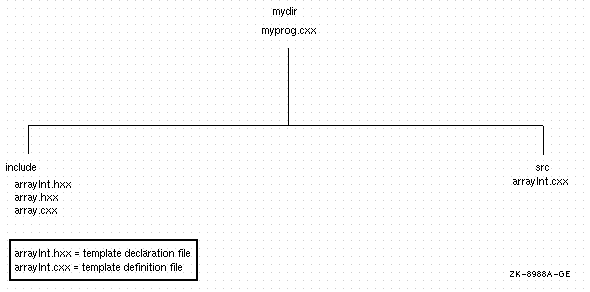
Figure 3-1 shows the placement of these files.
Figure 3-1 Placement of Template Declaration and Definition
Files
You would then compile myprog.cxx with
the following command:
cxx -I include myprog.cxx |
In this case, you do not need to create library source files because the static member data and out-of-line members of the array template class are instantiated at the time you compile myprog.cxx.
However you would need to create library source files for the following cases:
- Your template declaration file declares nontemplate classes, global functions (including friend functions), or global data that require definitions in a library source file.
- Your template declaration file declares a specialization of a template class whose static member data or out-of-line member function definitions must be placed in a library source file.
- Your template declaration file declares an out-of-line specialization of a template function, whose definition must be placed in a library source file.
3.4.3 Summary of Guidelines for Placing Definitions and Declarations
Table 3-1 describes where to place declarations and definitions, as discussed in Section 3.4.1 and Section 3.4.2.
| Feature | Declaration | Out-of-Line Definition |
|---|---|---|
| Class | Header file | |
| Static member data | Within class declaration | Library source file |
| Member function | Within class declaration | Library source file |
| Global function | Header file | Library source file |
| Global data | Header file | Library source file |
| Template class | Template declaration file | |
| Static member data of template class | Within template class declaration | Template definition file |
| Member function of template class | Within template class declaration | Template definition file |
| Global template function | Template declaration file | Template definition file |
| Global, nontemplate friend function of template class | Within template class declaration | Library source file |
| Specialization of template class | Template declaration file | |
| Specialization of template function | Template declaration file | Library source file |
3.4.4 Creating Libraries
Libraries are useful for organizing the sources within your application as well as for providing a set of routines for other applications to use. Libraries can be either object libraries or shareable libraries. Use an object library when you want the library code to be contained within an application's image; use shareable libraries when you want multiple applications to share the same library code.
Creating a library from nontemplate code is straightforward: you simply compile each library source file and place the resulting object file in your library.
Creating a library from template code requires that you explicitly request the instantiations that you want to provide in your library. See Chapter 6 for details on how to do this.
If you make your library available to other users, you must also supply the corresponding declarations and definitions that are needed at compile time. For nontemplate interfaces, you must supply the header files that declare your classes, functions, and global data. For template interfaces, you must provide your template declaration files as well as your template definition files.
For more information on creating libraries, see the ar(1) reference page and the loader(1) reference page.
| Previous | Next | Contents | Index |
|

privacy and legal statement