Preferences : Fonts
Preferences
 Fonts
Fonts
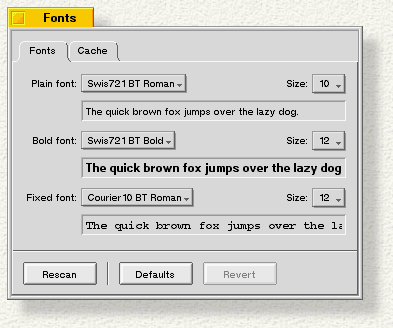
Fonts lets you set the system fonts and the size of the font caches. There are three types of system fonts: plain, bold, and fixed-spaced. Individual fonts have additional popups that let you choose among style options available for that font. You can set the size, from 9 to 12 points, with the Size: popup.
Click the Cache tab to set the size of your font caches:
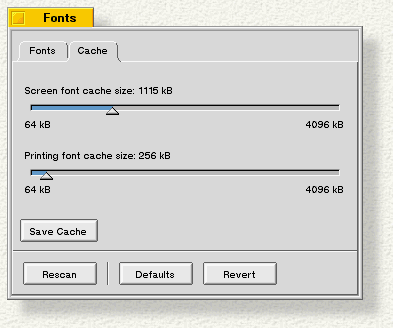
- Screen font cache size: determines how much RAM is allocated to hold font bitmaps. A large cache mean faster screen redraws, but less RAM available for applications.
- Printing font cache size: determines how much RAM is allocated to printer fonts. A large cache means faster printing, but less RAM available for applications. You need a Printer Font Cache only if you print to HP LaserJet-compatible printers.
Adding Fonts
BeOS includes a TrueType font renderer, which displays TrueType fonts in almost any size. The standard set of TrueType fonts included with BeOS is stored in /boot/beos/etc/fonts/ttfonts. These are the default system fonts; you should not change them.
You can purchase or download additional TrueType fonts in Windows (not Macintosh) format and add them to BeOS:
- Place the fonts in the /boot/home/config/fonts/ttfonts folder.
- To tell BeOS to look at your new fonts, click the Rescan button in the Fonts window. Or just reboot--the fonts are automatically rescanned when you start up BeOS.
To add PostScript fonts, make a new psfonts folder in /boot/home/config/fonts, and put your fonts there. Rescan or reboot, as you would for TrueType fonts.