Developer Release Notes: BeOS Release 4, The Interface Kit
Developer Release Notes
BeOS Release 4
A Word on Mouse Tracking
Because of improvement to the messaging system, you're encouraged to track the mouse by implementing MouseMoved(), rather than by polling GetMouse(). Additional BControl and BView functions (described below) assist you in this new technique.
Most Be-defined controls have been rewritten to behave asynchronously, but you have to tell the control's window to turn the feature on, by setting the window's new B_ASYNCHRONOUS_CONTROLS flag.
A Warning about get_key_map()
The get_key_map() behaviour has changed. The caller is now responsible for freeing the data that's returned in the function's two arguments. Fix your code or leak.
BAlert
-
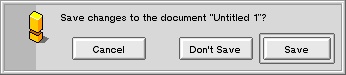
New BAlert constructor lets you shift the leftmost button even more to the
left, away from its neighbors. It's meant to be used in panels
that have a (leftmost) "Cancel" button, like this one:
BBitmap
- New IsLocked() boolean function.
BBox
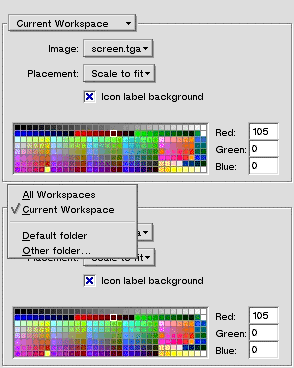
- A new version of BBox::SetLabel() lets you set some other BView as the box's label.
For example, the new Backgrounds preference app uses a pop up menu as the label
for the box around its quality controls:
- The new protected function SetTracking() lets you ease your way into the asynchronous world. If your BControl subclass wants to do asynchronous mouse tracking, it must call SetTracking(true) within its implementation of MouseDown(), and SetTracking(false) within MouseUp(). Note that you also have to set the BWindow's B_ASYNCHRONOUS_CONTROLS flag if you want asynchronous controls.
BFont and unicode_block
- Font rendering improvements:
- Better support for character escapements in rotated text.
- B_STRING_SPACING has been completely reimplemented and improved.
- A set of font "face" constants have been defined:
- B_ITALIC_FACE
- B_UNDERSCORE_FACE
- B_NEGATIVE_FACE
- B_OUTLINED_FACE
- B_STRIKEOUT_FACE
- B_BOLD_FACE
- B_REGULAR_FACE
To apply a face, you pass a combination of these constants to the new SetFamilyAndFace() function.
A font's face and style are mutually exclusive: Setting the face undoes the effect of SetFamilyAndStyle(). While specifying a style is technically more precise, specifying a face is, in most cases, more natural.
- The new FileFormat()
function returns the format of the file from which the font object
was created.
It returns a (new)
font_file_format constant, one
of...
- B_TRUETYPE_WINDOWS
- B_POSTSCRIPT_TYPE1_WINDOWS
- The new lightweight
unicode_block class
represents a UNICODE "block", or range of characters.
A number
of unicode_block objects are predefined in
the new UnicodeBlockObjects.h
file.
Some blocks
comprise a set of language characters
(B_BASIC_LATIN_BLOCK,
B_BASIC_HEBREW_BLOCK,
etc.).
Others define sets of special characters that can
apply to different languages
(B_GENERAL_PUNCTUATION_BLOCK,
B_MATHEMATICAL_OPERATORS_BLOCK,
etc.).
The contents of
the predefined objects follow the UNICODE specification.
-
Each BFont object contains a "master" unicode_block
object that comprises all its blocks; you can retrieve this
object through BFont's
Blocks() function.
-
To discover if the font supports a particular block (i.e.
a specific language), you query its master
block object through
unicode_block's
Includes() function:
	/* Does this font support palindromes? */

someFont->Blocks().Includes(B_MALAYALAM_BLOCK); - New
GetBoundingBoxesAsGlyphs(),
GetBoundingBoxesAsString(),
and GetBoundingBoxesForStrings()
return arrays of BRects that define the bounding boxes for
(a) a set of separate, unrelated characters,
(b) a set of characters considered as part of the same string, and
(c) entire strings.
- New GetGlyphShapes() returns the BShape objects that describe the characters in an array.
BMenu
-
New AddList() and
RemoveItems() let you add more than
one item (BMenuItem or sub-BMenu) at a time.
-
New DrawBackground()
hook function lets you draw into your menu's background.
- The new AddDynamicItem() hook function lets you defer the addition of a menu's items until the menu is actually needed. The greatest benefit of this feature is that it lets you control the "stubborness" of submenus. In R3, when the user hesitated over a submenu, the submenu would insist on drawing itself to completion, even if the user had moved off the submenu. Now, by properly implementing AddDynamicItem(), the submenu is told that the user has moved on so it can abort itself.
BMenuField
- New version of the
BMenuField constructor
accepts a
fixedSize boolean argument.
In a fixed size menu field,
the menu part of the object is sized so its right edge is always
with the right side of the
menu field's frame.
In a
non-fixed menu field, the menu is only big enough to accomodate the
menu item that it's currently displaying.
- New ShowPopUpMarker() and HidePopUpMarker() toggles the visibility of the little black triangle that indicates that the menu field is the unpopped representative of a pop-up menu.
B_MOUSE_MOVED Message
- The new "view_where" field in the B_MOUSE_MOVED message gives the mouse location in view coordinates (i.e. in the coordinates of the view over which the mouse is poised).
BPicture
- New Flatten() and Unflatten() functions let you write a BPicture to a file (or other BDataIO object).
BRect
-
BRect provides a bushel of new functions that transform the object
(or a copy) AND return the object (or the copy).
This means
you can transform a rect and use it as an argument at the
same time; for example:
new BView(someRect.OffsetBySelf(X_OFFSET, Y_OFFSET, ...);
BScrollView
- New SetTarget() function lets you set the "document view" that the BScrollView is scrolling. The new Target() function returns the object's current target.
BShape and BShapeIterator
New BShape and BShapeIterator classes work together to let you define a PostScript-like path that's an accumulation of lines and curves.
- A BShape object
is a script that contains the
array of line and bezier data.
- A BShapeIterator object realizes the BShape script in the implementations of its many hook functions (the BShapeIterator class is abstract).
BTabView
- New ContainerView() and
ViewForTab()
functions return the BTabView's
components views.
- Other new (and obvious) BTabView functions:
- CountTabs()
- SetTabs()
- SetTabLabel()
- TabLabel()
BView
- Two new BView constructor flags, B_DRAW_ON_CHILDREN and B_INPUT_METHOD_AWARE are required if you want your view to be able to draw on top of its child views, and if your view knows how to create an "input method", respectively.
- New DrawAfterChildren() hook
function is invoked after the view's children have finished drawing.
From within this function, your view is allowed to draw on top
of its children.
The function is only invoked if the
B_DRAW_ON_CHILDREN
flag was passed to the constructor.
-
The new SetMouseEventMask() function,
which can only be called from within MouseDown(), lets you
receive all mouse and/or keyboard events while the mouse
is down.
The mask only applies while the mouse is down;
once the user lets go of the mouse,
the mask is erased.
The view gets the events even if the mouse is
outside the view's bounds, and even if the view isn't the focus view.
To ask for events, you pass one or both of the new B_POINTER_EVENTS (i.e. mouse events) and B_KEYBOARD_EVENTS constants. For example:
void MouseDown(BPoint where)

{

   SetMouseEventMask(B_POINTER_EVENTS | B_KEYBOARD_EVENTS);

   ...

}
-
ClipToPicture()
and ClipToInversePicture()
let you use a BPicture
object to define a view's clipping region.
-
PushState()
and PopState()
let you push and pop graphics states.
This lets you alter the graphics environment before you draw, and then restore
the previous state when you're done.
Note that BView's Draw() function has
always been bracketed by an implicit push and pop.
The new explicit functions
bring this feature out to the rest of your app.
- A new version of
DragMessage()
takes an additional drawing_mode argument
(B_OP_OVER, B_OP_COPY, etc.)
that's used to draw the bitmap that represents the dragged message.
This permits, among other things, transparent dragged images (using the
new B_OP_ALPHA mode).
- New alpha blending functions:
void SetBlendingMode(source_alpha srcAlpha, alpha_function alphaFunc);


void GetBlendingMode(source_alpha *srcAlpha, alpha_function *alphaFunc) const;
These functions are used to determine how the images involved in transparent drawing operations (viz. those using the new B_OP_ALPHA drawing mode) are combined. See the BView documentation for details.
- New SetViewBitmap() lets
you set the view's background to be a BBitmap (or a portion thereof,
tiled in one of three decorative patterns).
ClearViewBitmap() removes the
bitmap.
- New StrokeShape() and FillShape() functions stroke and fill the BShape object argument.
BWindow
-
New BeginViewTransaction()
and EndViewTransaction()
functions disable and enable updates for all views in the window.
All update-related drawing instructions that are requested during the
transaction are executed when the transaction ends.
You should use these functions to bracket any hefty series of
view manipulations.
For example, if your window contains a large number of views and you need to
rearrange all of the views at the same time, you should definitely use these
functions -- you'll see a huge
performance benefit.
-
New IsMinimized()
function tells you if the window is currently minimized (hidden).
- A new window look!
The
B_NO_BORDER_WINDOW_LOOK
window_look constant creates a window with (get this)
no border! Makes a great party gift.
- New B_ASYNCHRONOUS_CONTROLS window flag primes the window to support asynchronous controls.
UI Layout and Colors (InterfaceDefs.h)
- New get_deskbar_frame()
returns the DeskBar's frame rectangle.
- Two new functions,
ui_color() and
tint_color() return
Be-certified UI colors. You're encouraged to use these colors
when designing your own UI.
The ui_color() function returns the "base" color of the UI element that's given by the argument:
rgb_color ui_color(color_which which);There's a small handful of color_which constants: B_PANEL_BACKGROUND_COLOR, B_MENU_BACKGROUND_COLOR, and the like.
The tint_color() function takes an rgb_color value and "tints" it by some amount:
rgb_color tint_color(rgb_color color, float tint);Again, there are a few predefined tinting constants (floats), such as B_DISABLED_LABEL_TINT and B_HIGHLIGHT_BACKGROUND_TINT. Between the color_which values and the tinting constants, you should be able produce almost every color used by the Be UI elements.
- New vertical_alignment
constants (B_ALIGN_TOP,
BE_ALIGN_MIDDLE,
B_ALIGN_BOTTOM) are provided for
completeness. The Be UI objects don't use these values (yet).
- New tiling constants -- B_TILE_BITMAP, B_TILE_BITMAP_Y, and B_TILE_BITMAP_X -- are used by BView's SetViewBitmap() to express the desired tiling pattern.
Pixels, Colors, and Transparency (GraphicsDefs.h)
- New get_pixel_size_for()
function returns pixel statistics for a given color space.
-
New B_TRANSPARENT_... constants:
- The new
B_TRANSPARENT_COLOR
constant is used as an argument to
BView::SetViewColor() to tell the app server that the
view's background needn't be drawn.
- The new B_TRANSPARENT_MAGIC_... constants (which come in a variety of color spaces) are used to set transparent pixels in a BBitmap.
These new constants make the old B_TRANSPARENT_32_BIT and B_TRANSPARENT_8_BIT constants obsolete. The old constants are supported for compatibility, but don't use them in new code.
- The new
B_TRANSPARENT_COLOR
constant is used as an argument to
BView::SetViewColor() to tell the app server that the
view's background needn't be drawn.
-
New B_OP_ALPHA
drawing_mode constant enables transparent rendering.
-
There are a mess of new color_space constants with
acronymical names:
B_YUV...,
B_CMYK...,
B_YCbCr..., etc.
Some of these spaces are provided for generality and
possible conversion; they aren't all supported by BBitmap.
Which explains...
- ...the new
bitmaps_support_space()
function. It tells you if a given color_space can be used
in a BBitmap.
Copyright © 1998 Be, Inc. All rights reserved.