Be User's Guide: Keymap
| The Be User's Guide Table of Contents |
Customizing the BeOS: Keymap
Keymap shows you the current keymap—the characters you see on-screen when you
press each key.
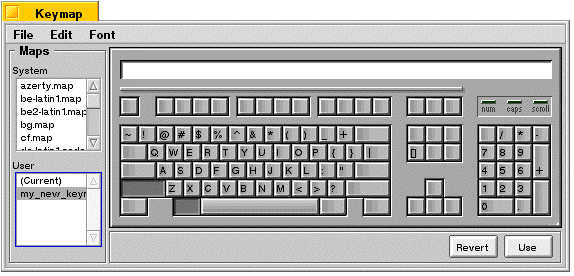
You can select a system keymap and type on the keyboard or click keys in the Keymap window to see the resulting character in the field at the top of the window. Each keymap is made up of nine tables that show how the "character" keys are mapped when different modifier keys are held down (the default display is with no modifiers). To see a particular modifier key map, hold down a modifier key combination (Shift, Windows/Option, Alt) when you click or press a character key.
Different fonts map characters to different keys. You can choose a font from the Font menu to see that font's mapping. This is a useful way to look for characters you don't use often, such as bullets, accents, or other special characters.
You can change the keymap to support different languages or keyboard layouts. The BeOS comes with a number of preconfigured keymaps to choose from in the scrolling Maps list. To customize a keymap or create your own:
- Choose any user or system keymap.
- Click File and Save As... and enter the name of your new keymap.
- Make sure the keymap is being saved to /boot/home/config/settings/keymap.
- To make the keymap selected in the Keymap window active, click the Use button in the lower-right corner.
- The new keymap is displayed in the User list.
You can customize a keymap by using the second mouse button to drag a character key from one position to another. When you do this, all the modifier mapping tables move with the key.
To revert to the default keymap, choose one of the standard System keymaps.
 |
NOTE: Selecting a new keymap may change the shortcut key in the Menu preferences. |
for BeOS Release 4.5.
Copyright © 1999 Be, Inc. All rights reserved.