Be User's Guide: Workspaces
| The Be User's Guide Table of Contents |
Customizing the BeOS: Workspaces
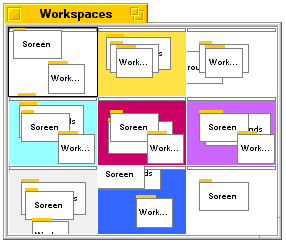 Workspaces is an interface to the different working areas,
or workspaces, that you have set up.
The default number of workspaces is nine but you can have as many as 32;
you set this number in the Screen preferences.
Workspaces is an interface to the different working areas,
or workspaces, that you have set up.
The default number of workspaces is nine but you can have as many as 32;
you set this number in the Screen preferences.
When you launch Workspaces, a "workspace map" is displayed; the windows in each workspace are represented in miniature:
To switch to another workspace, click in a "pane" in the Workspaces window, or press Alt+Fn (function key n) where n is a number between 1 and 9: Alt+F1 takes you to the first workspace, Alt+F2 takes you to the second, and so on. Workspaces are numbered left-to-right (first) and top-to-bottom (second).
You can move a window from one workspace to another by dragging its miniature representation in the Workspaces window. When you open a folder that's already open in another workspace, the window is brought into your current workspace, and is removed from the workspace it was in. However, if you select a window from the Deskbar's Window List, you're taken to the workspace that the window is open in ("remote" windows are indicated by "speedlines" in the Window List).
for BeOS Release 4.5.
Copyright © 1999 Be, Inc. All rights reserved.