Be User's Guide: Menu
| The Be User's Guide Table of Contents |
Customizing the BeOS: Menu
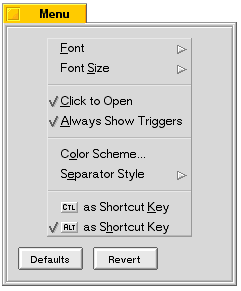 Menu lets you change the appearance and behavior of menus throughout the BeOS.
Most importantly, it lets you set the system-wide shortcut key—this is the key
that you use in combination with a character to perform a menu command.
Menu lets you change the appearance and behavior of menus throughout the BeOS.
Most importantly, it lets you set the system-wide shortcut key—this is the key
that you use in combination with a character to perform a menu command.
The settings in the Font preference are:
| Setting | Lets you do this |
|---|---|
| Font | Choose a font and style. |
| Font Size | Choose a font size. |
| Click to Open | If checked, lets you open a menu or submenu by clicking the menu's title; if unchecked you can only drag through menus. |
| Always Show Triggers | If checked, triggers for menu titles, commands, and other menu items are always visible and can be activated by pressing the trigger letter. |
| Color Scheme | Set the colors that are used in menus. |
| Separator Style | Choose the type of separator that's used to group commands in a menu. |
| Key as Shortcut Key | Choose Alt or Control as your shortcut key. (On Macintosh, the Alt key appears as the Apple "cloverleaf.") |
Menu changes are enforced when you launch an application. For example, if you change the menu font size, the applications that are currently running aren't affected, but all subsequently launched applications will display the change.
for BeOS Release 4.5.
Copyright © 1999 Be, Inc. All rights reserved.