Be User's Guide: DataTranslations
| The Be User's Guide Table of Contents |
Customizing the BeOS: DataTranslations
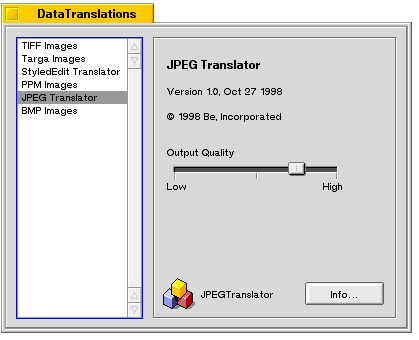 Data translators let you open or save a file as a particular type.
For example, if you want to look at a GIF file, you need a GIF translator on your
system to open the file.
DataTranslations shows you which translators
you have on your system, and lets you adjust their settings (where applicable).
For example, the JPEG translator lets you adjust the output quality of the image.
Data translators let you open or save a file as a particular type.
For example, if you want to look at a GIF file, you need a GIF translator on your
system to open the file.
DataTranslations shows you which translators
you have on your system, and lets you adjust their settings (where applicable).
For example, the JPEG translator lets you adjust the output quality of the image.
The BeOS ships with TIFF, Targa, StyledEdit, JPEG, and BMP translators. Other applications (such as Gobe Productive) add translators to your system when you install them. To add a translator on your own, drag it into the DataTranslations window.
for BeOS Release 4.5.
Copyright © 1999 Be, Inc. All rights reserved.