Be User's Guide: Setting the Boot Volume
| The Be User's Guide Table of Contents |
Customizing the BeOS: Setting the Boot Volume
On Intel, you choose the BeOS volume that you boot from (the boot volume) by
using
the BeOS boot manager, Bootman, which runs at the end
of the installation procedure.
See the Installation Guide that comes with this release
for more information on Bootman.
On PPC, you set the boot volume by using the Boot preference, described below.
Note that using Boot to set the boot volume is only
meaningful if you have the BeOS installed on more than one volume or disk.
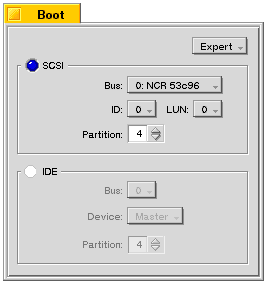 Boot's
Easy/Expert popup lets you choose
the boot volume by name (Easy) or by its bus address
(Expert).
If you're booting from a SCSI hard disk, leave the LUN:
(Logical Unit Number) set to 0.
Boot's
Easy/Expert popup lets you choose
the boot volume by name (Easy) or by its bus address
(Expert).
If you're booting from a SCSI hard disk, leave the LUN:
(Logical Unit Number) set to 0.
for BeOS Release 4.5.
Copyright © 1999 Be, Inc. All rights reserved.