Welcome to the BeOS
 |

The BeOS Virtual TourWelcome to the BeOS
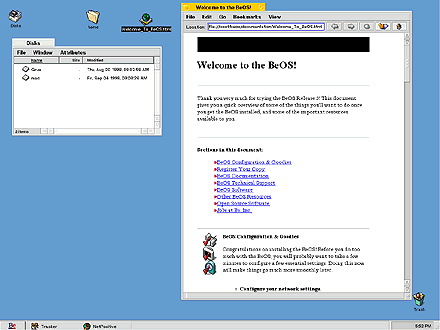
The BeOS uses familiar symbols and ideas (files, folders, desktops, etc.), so getting around is easy. The BeOS GUI is known as Tracker, and the key to Tracker is the TrackBar, shown here across the bottom of the screen. The TrackBar can be moved and configured according to your preferences, as other screens will show. Along with the files on your BeOS drive, you can view files stored on your or DOS FS or HFS disks and write files to HFS disks. "Symbolic links" (equivalent to Shortcuts and Aliases) allow convenient access to files, folders and applications. The "Welcome_To_BeOS.html" icon shown on the desktop above is in fact a symbolic link to the actual document stored in a documentation folder. BeOS documentation is stored on your local drive in HTML format, easily accessible through Be's web browser, NetPositive. When you want to get rid of some files, throw them in the Trash. As with actual trash, you must empty it before it is really gone. For more on this topic, check out the BeOS User's Guide. So much for the basics. Let's take a look under the hood.
Tour Index | Next
BeOS Release 4 |